
Affiliate-Links: Bei Links mit * erhalten wir eine Provision. Für dich ändert sich der Preis nicht. Details in der Datenschutzerklärung.
KI-Assistenz — KI-Hinweis: Dieser Beitrag wurde von DadChecks Editorial KI-gestützt erstellt und von den automatisierten Prüfagenten der Redaktion geprüft. Keine Person hat den Beitrag selbst geschrieben oder selbst getestet. Es handelt sich um eine Recherche, nicht um einen Praxistest: Es gab keine eigene Testhardware, keine eigenen Messungen und keine eigene Kaufentscheidung.
A backup you have never restored is a hypothesis, not a backup. The gap is not the software but whether you ran the restore and watched it work.
This is Part 3 of a three-part series on building a budget home lab. Part 1 covers Raspberry Pi 5 vs Used Mini PC, Part 2 covers Installing Proxmox VE on a Used Mini PC. It assumes a running Proxmox VE 9.2 with at least one guest. For the network the host lives on, read Build a Smart-Home-Ready Network; for the second machine this one is backed up from, Choosing a Budget Batocera PC; and the install guide covers the checks that sit alongside a backup routine.
What this article covers
Objective: build a backup plan for a single-node home lab that you have actually verified — guests and host configuration — with a copy that survives loss of the host.
Requirements: a running Proxmox VE 9.2 installation and one guest worth protecting. Every command below comes with its syntax.
Applicable versions: Proxmox VE 9.2 on the Proxmox side, Proxmox Backup Server 4.2 on the PBS side. The support matrix lists Proxmox VE 9 against Debian 13 (Trixie), with Proxmox Backup 4 as the current line.
Prerequisites: backup storage off the guests’ disk, and — with Proxmox Backup Server — a second machine with enough disk to hold them.
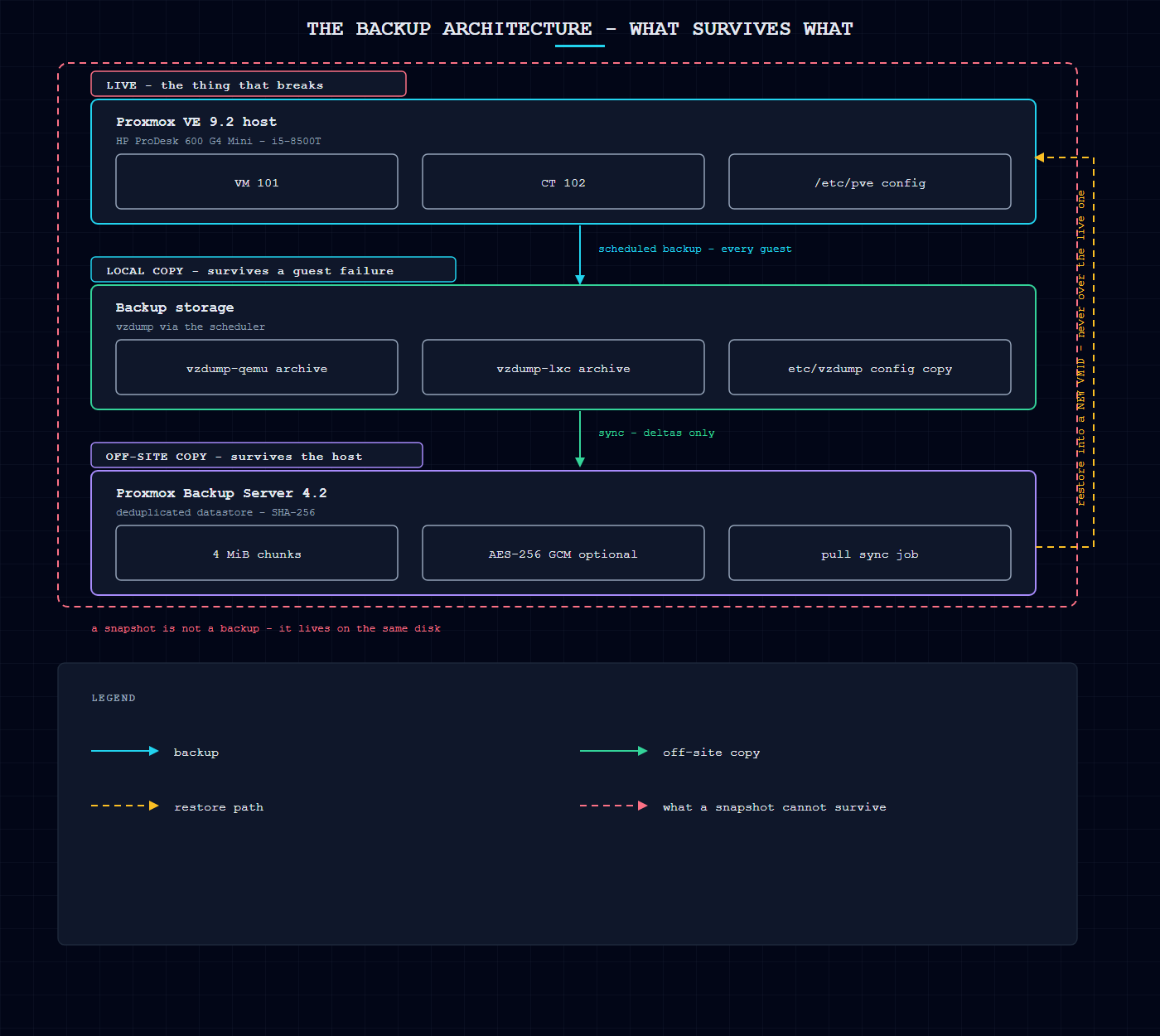
Snapshots are not backups
Proxmox’s documentation states the key idea directly: “Please note, snapshots are not included in the backup – see backup logs.”
Per the wiki’s live-snapshots page: “By using Proxmox VE live snapshots you can preserve the KVM virtual machine state. A snapshot includes the contents of the virtual machine memory, virtual machine settings, and the state of all the virtual disks.”
Wonderful feature, wrong tool for disaster recovery — for three reasons, all following from where the data lives:
- Stored on the same storage as the guest. In-place: if the disk fails, the snapshot goes with it.
- Rolling back destroys what happened after it. A rollback, not a restore: writes between snapshot and rollback are gone. You want that during a botched update; you do not when a guest silently corrupted a database three days ago.
- Not copied anywhere. A restore point inside the first copy, not a second copy.
A wording trap: in the vzdump documentation --mode snapshot does not describe a stored snapshot. It is a consistency mode of the backup: “This mode provides the lowest operation downtime, at the cost of a small inconsistency risk.”
What a Proxmox backup is
A backup is an archive written to a separate, separately configured storage target: “Proxmox VE backups are always full backups – containing the VM/CT configuration and all data.”
Two storage classes exist. A file-level backup lands as a single archive file named for guest type and time; a block-level backup lands as a set of images for a VM. Compression is optional: “The backup file can be compressed with one of the following algorithms: lzo, gzip or zstd.”
Global settings live in /etc/vzdump.conf, which “The file uses a simple colon separated key/value format”. Per-job settings live in /etc/pve/jobs.cfg, where the scheduler reads them.
Backup modes, and what they cost you
| Mode | What happens | What it costs |
|---|---|---|
| stop | “This mode provides the highest consistency of the backup, at the cost of a short downtime in the VM operation. It works by executing an orderly shutdown of the VM, and then runs a background QEMU process to backup the VM data.” | Downtime equal to the backup duration. Often right for the database VM. |
| snapshot | Data blocks are copied while the VM runs. “If the guest agent is enabled (agent: 1) and running, it calls guest-fsfreeze-freeze and guest-fsfreeze-thaw to improve consistency.” | Near-zero downtime, small inconsistency risk; the guest agent must be running. |
| suspend | A middle option; the snapshot mode is recommended instead. | Not the first choice for a new setup. |
For VMs: “Proxmox VE live backup provides snapshot-like semantics on any storage type. It does not require that the underlying storage supports snapshots.” Containers differ: snapshot mode “requires that all backed up volumes are on a storage that supports snapshots”.
Consistency in every mode depends on the guest agent: “When backups (or snapshots) are triggered for VMs in Proxmox VE, it is necessary to make sure that the guest has written the latest changes to the disk image before the backup starts (or the snapshot is created). This is handled by the Qemu-Guest-Agent inside the guest OS.”
Where the backups go
The capable route is Proxmox Backup Server: “Proxmox Backup Server is an enterprise-class, client-server backup solution that is capable of backing up virtual machines, containers, and physical hosts.” It plugs into Proxmox VE as an ordinary storage backend — “This backend allows direct integration of Proxmox Backup Server into Proxmox VE like any other storage” — native since Proxmox VE 6.3.
- Deduplication. “The deduplication layer avoids redundancy and minimizes the storage space used.” Chunk-based: “The deduplication of datastores is based on reusing chunks, which are referenced by the indexes in a backup snapshot”. For block-level backups “the content (disk image), is split into chunks of the same length (typically 4 MiB)”.
- Incremental transfer. “Reading and sending only the delta reduces the storage and network impact of backups.” If the chunk already exists on the server, “it can send only the checksum instead of data and checksum”. Dirty bitmaps make it cheaper still: “only modified chunks of the disk need to be uploaded to a backup”.
- Still a full backup logically — the sentence that trips people up: “With Proxmox Backup Server, backups are sent incrementally to the server, and data is then deduplicated on the server. … Each backup still references all data and such is a full backup.” A restore needs no other snapshot.
- Integrity checking. “The built-in SHA-256 checksum algorithm ensures accuracy and consistency in your backups.”
- Encryption. “Backups can be encrypted on the client-side, using AES-256 GCM.”
- Remote sync. “It is possible to efficiently synchronize data to remote sites. Only deltas containing new data are transferred.”
What to buy
Two routes, decided by data volume and whether you run a second machine.
| Item | Price | Note |
|---|---|---|
| SanDisk Extreme Portable SSD 1 TB* | EUR 159.00 as of 2026-11-16 | Amazon.de. The small lab’s whole backup target. |
| SanDisk Portable SSD 2 TB (non-Extreme)* (one of these two — see the totals below) | EUR 215.64 as of 2026-11-16 | Amazon.de. The alternative when the lab outgrows 1 TB. |
| Seagate Expansion Desktop 4 TB* | EUR 147.99 as of 2026-11-16 | Amazon.de. Cheapest verified 4 TB drive for archive copies. |
| UGREEN NASync DH2300 2-bay NAS, diskless* (one of these two — see the totals below) | EUR 169.99 as of 2026-11-16 | Amazon.de. Chassis only; the drives are separate lines. |
| Synology DS223 2-bay NAS, diskless* (one of these two — see the totals below) | EUR 321.43 as of 2026-11-16 | Amazon.de. The better-supported software option, at a higher price. |
| UGREEN 10 Gbps NVMe M.2 SSD enclosure* | EUR 14.99 as of 2026-11-16 | Amazon.de. Turns a loose M.2 drive into a backup disk. |
| Single-disk backup route total | EUR 173.99 as of 2026-11-16 | A portable SSD as the backup target and an enclosure if you reuse a loose M.2 drive. |
| NAS backup route total | EUR 484.41 as of 2026-11-16 | A NAS chassis with one archive drive. The chassis arrives diskless, so the drive is a separate line. |
| Price date | 2026-11-16 | Prices checked on 2026-11-16. Source: Amazon.de product pages (EUR as displayed on the day); diskless NAS chassis prices are the bare chassis, no disks |
The single-disk route suits most home labs: a portable SSD as the backup target, plus an enclosure if you reuse a loose M.2 drive. The NAS route is for labs that want a second always-on machine. The NAS chassis arrives diskless, so the drive is a separate line in the route total. Prices are a dated observation from the Amazon.de product pages on 2026-11-16.
Scheduling
Jobs are managed under Datacenter → Backup, or through the /cluster/backup API endpoint. Either way, “Both will generate job entries in /etc/pve/jobs.cfg, which are parsed and executed by the pvescheduler daemon.”
The schedule format “is very similar to systemd calendar events”. A job binds to every cluster node or one specific node, and per-job retention overrides the storage’s or node’s settings.
vzdump 777 --prune-backups keep-last=3,keep-daily=13,keep-yearly=9
In practice: three backups beyond the daily series, thirteen daily, nine yearly. The yearly count matters most — “you can always reduce it if you find it is unnecessarily high, but you cannot recreate backups once they have been removed.”
Retention, and the rule that surprises people
The options are keep-all, keep-last, keep-hourly, keep-daily, keep-weekly, keep-monthly, keep-yearly, and the processing order is not obvious: “The retention options are processed in the order given above. Each option only covers backups within its time period.”
keep-last=3 peels off the three most recent; keep-daily=13 then works on what remains, keeping the latest backup in each of the next thirteen days.
On PBS, protected backups are special: “Protected backups are ignored by pruning and do not count towards the retention settings.” Keep the one taken before a risky change.
Encryption: what native vzdump does not do
Native vzdump to a directory or an NFS share does not encrypt the backup: vzdump(1) has no encryption flag, and the compression flag only offers --compress with lzo, gzip or zstd. Backups written to a NAS over the network sit in the clear.
Proxmox Backup Server adds client-side encryption. The key is “saved in a file under /etc/pve/priv/storage/<STORAGE-ID>.enc with access restricted to the root user”, and “The encrypted copy of the backup encryption key will be appended to each backup”.
- The key is the backup. “Without their key, backed up files will be inaccessible. Thus, you should keep keys ordered and in a place that is separate from the contents being backed up.”
- Off by default. “Note that you also need the corresponding key file if the backup was encrypted.”
- Different keys do not deduplicate together. “However, deduplication between backups with different keys is not possible, so it is often better to create separate datastores” for encrypted and unencrypted backups.
The vendor’s advice for a home lab: “Do not use encryption if there is no benefit from it, for example, when you are running the server locally in a trusted network.”
The host configuration, which is not in any guest backup
This is the step people skip. A guest backup contains the guest, not the hypervisor’s configuration: storage definitions, users, realms, firewall rules, backup jobs.
The PVE-side documentation gives the requirement plainly: “Backup all files in /etc — required: files in /etc/pve, as well as /etc/passwd, /etc/network/interfaces, /etc/resolv.conf, and anything that deviates from a default installation.”
Two details make this practical. The config files are also written into each backup archive — “Configuration files are also stored inside the backup archive (in ./etc/vzdump/) and will be correctly restored” — and when rebuilding, the documented first step is “Restore the file /etc/pve/storage.cfg“.
PBS has its own host-backup path: proxmox-backup-client backup etc.pxar:/etc. One caveat: “proxmox-backup-client does not automatically include mount points”. Include them explicitly with --include-dev.
Restoring
qmrestore <VMID> <FILE> [OPTIONS]— “Restore QemuServer vzdump backups.” The target VMID is where the guest lands.pct restore <VMID> <FILE> [OPTIONS]— “Create or restore a container.”--force <boolean>— “Allow to overwrite existing VM.” Without it, a restore into an occupied VMID is refused; with it, you overwrite a running guest.--unique <boolean>— “Assign a unique random ethernet address.” This makes a test restore safe: the restored guest gets a different MAC, so it does not fight the live one for the same DHCP lease or ARP entry.
Two container restore modes differ only in mount point handling: Simple restores the mount point configuration from the backed-up file; the other creates volumes on the storage you name with the storage parameter.
Verify the restore — the step that is not optional
The honest position: Proxmox’s documentation describes no “test restore” flag, and no documented command verifies an archive end to end. It gives you the tools to do it yourself, plus the server-side verify operation on PBS.
- Restore to a new VMID. Pick an unused ID; do not overwrite the live guest.
- Use
--unique. The restored guest gets a fresh MAC, so it can boot beside the original without a network fight. - Do not start it yet. Attach the disks, check the VM was created with the configuration you expect, then start it isolated.
- Check what the guest says, not the interface. A successful restore means the guest boots, its filesystem is clean, its services start and its data is where it should be.
- Run PBS
verifyon the server for the backup you restored from. That checks the stored data, not the restore. - Delete the test guest afterwards and record it, with the date and the backup ID.
Keep a written record — date, backup, VMID, what you checked, the result.
Backup planning checklist
- Every guest has a scheduled backup job — check Datacenter → Backup, and that the job actually ran. A broken storage target fails quietly.
- The backup target is on different hardware from the guests, not another partition on the same disk.
- There is a copy somewhere else. A backup on the same shelf as the server is no backup against fire, theft or a flooded shelf. With PBS, a pull sync job copies the datastore off-site: “Sync jobs are configured to pull the contents of a datastore on a Remote to a local datastore.”
- The host configuration is backed up separately —
/etc/pve,/etc/passwd,/etc/network/interfaces,/etc/resolv.conf. - Retention is set on every job, and you know what the numbers mean.
- The backup before a risky change is protected, so pruning cannot remove it.
- The guest agent is installed in every VM you care about; without it, the consistency guarantee does not hold.
- You have restored one backup, end to end, and written down the result.
- The keys are stored apart from the data, if you use encryption.
Recovery verification checklist
Run after every restore, and at least once per quarter.
- The restore command completed with a success status, and the archive came from the expected backup storage.
- The guest was created with the expected name, CPU type, memory and disk configuration.
- The guest booted, and its filesystem came up clean with no recovery errors.
- The services inside the guest started, and the data is present and current — not merely that the disk is attached.
- The network identity is disconnected or changed (
--unique), so the test did not disturb the live guest. - The test guest was deleted afterwards, and the free VMID returned.
- The date, the backup ID and the result were written down.
Basic backups vs Proxmox Backup Server
| Native vzdump to a directory or NFS | Proxmox Backup Server | |
|---|---|---|
| Format | One archive file per backup | Chunk-based datastore with indexes |
| Full or incremental | Always full | Full logically, incremental on the wire and on disk |
| Deduplication | None | Chunk-level, across backups |
| Compression | lzo, gzip or zstd, per backup | Zstandard, server-side |
| Encryption | None | Client-side AES-256 GCM, off by default |
| Integrity check | None built in | SHA-256 per chunk, plus a server-side verify operation |
| Off-site copy | Whatever you copy it with | Pull or push sync jobs, deltas only |
| Needs a second machine | No | Yes — PBS is a server |
| Best for | A small lab that wants files readable with any tool | A lab where full copies stop fitting, or a second copy it does not want to manage by hand |
Maintenance routine
- Weekly: confirm the jobs ran and the backup set size did something sensible. A flat size means a guest stopped being backed up.
- Monthly: run one restore test into a throwaway VMID, and write down the result.
- Quarterly: check that your off-site copy exists and is current, and that you can still log in to wherever it lives.
- On PBS: garbage collection reclaims the space of chunks no backup references any more. The commands are
proxmox-backup-manager garbage-collection start <store>andproxmox-backup-manager garbage-collection status <store>. - After every upgrade or network change: take a manual backup before the change, and protect it from pruning.
Limitations
- This is a documented procedure, not a tested one. It was written against the Proxmox VE 9.2 and Proxmox Backup Server 4.2 documentation and verified against it. No restore was executed — which is exactly why the verification section spells out the procedure instead of claiming a result.
- No “test restore” command exists to shortcut the verification. The guidance here is the documented tooling used the documented way; the reader has to run it.
- PBS is covered in outline, not in depth. Datastore internals and key-management workflows are in the PBS documentation.
- The prices are one day’s observation. They are dated in the table and will move.
References
- Proxmox Admin Guide, backup and restore: chapter-vzdump.html
- Proxmox
vzdumpmanual: vzdump.1.html - Proxmox
qmrestoremanual: qmrestore.1.html - Proxmox
pctmanual, container restore modes: pct.1.html - Proxmox Wiki, backup and restore: Backup and Restore
- Proxmox Wiki, live snapshots: Live Snapshots
- Proxmox Backup Server documentation: introduction, technical overview, storage, managing remotes, backup client
- Proxmox Admin Guide, storage management: chapter-pvesm.html
- Proxmox Admin Guide, FAQ, support matrix: chapter-pve-faq.html